
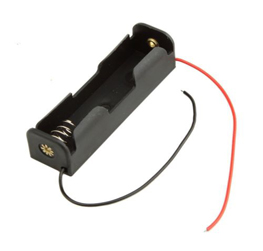
 Black Plastic Storage Box Case Holder For Battery 1x 18650 With Wire Leads
 Subtotal: ₹35.40 (incl. tax)


Batteries & Chargers, Battery holder & Box, Circuits Boards & PCB, Power Supply
Lithium Battery Charging Board TP 4056 Micro USB with Protection
Availability:
81 in stock
This tiny module is perfect for charging single cell 3.7V 1 Ah or higher LiPo cells such as 16550s that don’t have their own protection circuit.Based around the TP4056 charger IC and DW01 battery protection IC this module will offer 1A charge current then cut off when finished.Futhermore when the battery voltage drops below 2.4V the protection IC will switch the load off to protect the cell from running at too low of a voltage – and also protects against over-voltage and reverse polarity connection (it will usually destroy itself instead of the battery) however please check you have it connected correctly the first time.
For Bulk Quantity Please call US:- +91 9830150448
₹64.90 Price Including GST
81 in stock
CompareLithium Battery Charging Board TP 4056 Micro USB with Protection
Using the module
- Connect micro USB cable for power, or 5V DC to pads marked IN+ and IN- on left-hand side of the module
- Connect cell to charge to B+/B- pads on right-hand side of module
- A load (something for the battery to power) can be connected to the OUT+/OUT- pads on the right-hand side
- Important! Disconnect load when charging
- The red LED indicates chaging in progress, green LED indicates charging has finished.
- Never charge your battery at a rate greater than 1C.
Specifications
- Input voltage – 5V via microUSB or solder pads on left-hand side of module
- Full charge voltage – 4.2V
- Charging current – 1A by default.
- However you can change this by changing the 1k2 resistor next to the “IN-” pad the bottom-left of the board.
- See the Rprog table on page three of the TP4056 data sheet for different values and matching charging currents
Based on 1 review
Add a review
Related products
-
Batteries & Chargers, Power Supply
Fast Quick Charger QC3.0 DC-DC Step Down Buck Converter
DC-DC Step Down Buck Converter Charging Module USB 6-32V 9V 12V 24V to QC3.0 QC2.0 Fast Quick Charger 3V 5V 12V Circuit Board.Support fast charging protocol for BC1.2, iPhone, Samsung agreementfor Qualcomm QC2.O and QC3.O
SKU: CE-M091 -
Batteries & Chargers, Circuits Boards & PCB, Power Supply
USB Charger DC-DC PFM Control 0.9-5V Boost module
 Batteries & Chargers, Circuits Boards & PCB, Power Supply
USB Charger DC-DC PFM Control 0.9-5V Boost module
Mini PFM Control.On-board input voltage indicator.High conversion efficiency, maximum to 96%.Any DC voltage input 0.9V ~ 5V, output 5V DC voltage can be stable,
with two AA batteries input to the output current of 500-600MA, single AA battery power supply output current about 200MA On-board USB female, can supply power directly to the USB interfaceSKU: CE-M020



nandha (verified owner) –
Good product. very useful. Thanks
nandha –